SurfSense
For businessPluginsDocsPricing
16.3k
SurfSense

One private workspace for everything
you read, save and ask.

© SurfSense 2026. Free and open source.

Product

  • Download
  • For business
  • Plugins
  • Pricing
  • Docs

Resources

  • Blog
  • Announcements
  • Changelog
  • Contact us

Company

  • Privacy Policy
  • Terms of Service

Changelog

Stay up to date with the latest updates and improvements to SurfSense.

August 16, 2026Release

Reports and resumes have moved to artifacts

SurfSense now creates reports, resumes, and other deliverables through the artifacts system. Deliverables generated by the previous report and resume tools are no longer available after this upgrade. Ask SurfSense to regenerate an old deliverable to receive a new artifact that can be viewed and downloaded from the artifacts library.

Document export has also been removed from the document editor. Download generated deliverables from the artifacts library, or export a workspace or folder as a ZIP when you need a Markdown copy of knowledge-base content.

July 5, 2026Release

SurfSense's Next Chapter: Open Web Research for AI Agents

Happy Independence Day to everyone celebrating in the United States! We hope you had a wonderful Fourth of July. It felt like the right weekend for a declaration of our own.

Today we are pointing SurfSense at a single mission: give your AI agents the primitives to research the open web.

How we got here

For the past couple of months we set out to build the best general research agent for your own knowledge. That chapter treated us well. As the open-source alternative to NotebookLM, SurfSense earned a community we are genuinely proud of: more than 15,000 GitHub stars, self-hosted deployments everywhere from homelabs to enterprises, and users who pushed the product further than we imagined.

That same period settled a bigger question. Agentic tools like Claude, OpenCode, Hermes, and OpenClaw have proven themselves. Agents that plan, use tools, and finish multi-step work on their own are no longer a demo, they are how work gets done. General research assistance is becoming something every capable agent does out of the box.

So we asked what these agents still lack. Not reasoning. Not tools. Live data from the places where answers actually live, and the workflows around it. An agent asked "what is Reddit saying about this product since launch?" or "what do the reviews of these ten places actually complain about?" has nowhere trustworthy to look. Official platform APIs are rate-limited or missing, scraping plumbing is brittle, and driving a browser with an LLM burns minutes and tokens per page. We want to be the open-source platform that gives agents those primitives.

What SurfSense is now

  • Platform-native connectors for live web data. Reddit, YouTube, Google Maps, Google Search, and the open web. Each one is a typed REST endpoint returning structured JSON — posts, comments, transcripts, reviews, SERPs, pages — that you can call from any language with your SurfSense API key. And the catalog keeps growing beyond social platforms and search.
  • An MCP server that makes every connector an agent tool. Add the SurfSense MCP server to Claude, Cursor, or your own agent framework. And with external MCP connectors, your SurfSense agents can use any MCP server too, with one-click OAuth for apps like Notion, Slack, and Jira.
  • An agent harness, not just raw data. Retries, structured output, and credit metering are built in, so agents go from a question to a cited brief without you building the plumbing.
  • Automations for the workflows that matter. Scheduled and event-triggered agents watch pages, track mentions, monitor rankings and reviews, then deliver briefs and alerts.
  • Simpler pricing. Self-hosting stays free with no metering. Cloud is pay as you go: start with $5 of free credit, connectors bill per item returned, crawls per page fetched, models at provider cost. Failed calls are never billed. Details on the pricing page.

To our existing users: nothing you rely on is going away

This is an addition, not a replacement. Your knowledge base, chat with citations, reports, podcasts, presentations, automations, and collaborative chats all keep working exactly as they do today. You can still upload files and sync Google Drive, OneDrive, and Dropbox. Self-hosting stays free and open source, and your existing deployments keep running without any action from you. What changes is where we invest: expect deeper connectors, sharper agent workflows, and broader coverage of the open web.

If you are building agents, grab an API key or add the MCP server, and start with the connector catalog. Tell us what you are building on Discord or GitHub.

We think the next great research tool will not be another dashboard or another chat window. It will be an agent that can actually reach the live web. We are building the platform it runs on.

May 31, 2026Version 0.0.26

What's New in v0.0.26

v0.0.26 is our biggest workflow release yet: AI automations land in SurfSense. If you've been looking for open source AI automation, a self-hosted AI agent that runs on a schedule, or document workflow automation that reacts the instant a file shows up, this release is for you. Describe what you want in plain English, let SurfSense draft the automation, approve it, and your agent runs on its own: on a cron schedule or triggered by real events in your knowledge base. Best of all, automations work across your connectors, so one workflow can search and act on Notion, Slack, Google Drive, Gmail, GitHub, Linear, Jira and Confluence. This release also brings connector @-mentions into chat, a faster anonymous chat experience, and a redesigned homepage.

AI Automations

Turn one-off prompts into repeatable, hands-off AI agent workflows.

  • Build Automations From Chat: Describe an automation in plain English and SurfSense drafts it for you. Review the generated workflow in a human-in-the-loop approval card, tweak it, and save. No config files, no code.
  • Scheduled AI Workflows: Run an agent on a cron schedule for daily briefs, weekly digests, and recurring reports. SurfSense computes the next run time and fires it automatically in the background.
  • Event-Triggered Automations: Kick off an agent the moment a document enters a folder. SurfSense's new in-process event bus watches your knowledge base and launches the right automation as soon as the event happens.
  • Agent Task Action: Every automation runs a full multi-agent chat turn, so your scheduled and event-driven runs have the same reasoning, search, and tool access as a live chat, with an auto-approve loop so they finish unattended.
  • Automations Across Your Connectors: Because each automation runs a full agent turn, your scheduled and event-triggered workflows can search and act across all 25+ connected sources, including Notion, Slack, Google Drive, Gmail, GitHub, Linear, Jira, Confluence, and your Obsidian vault.
  • Automations Dashboard: A dedicated list view shows every automation with its status, plus one-click pause, resume, and delete. Find it in the sidebar under Inbox.
  • Detail & Run History: Open any automation to inspect its definition, manage triggers inline, and browse a complete run history with inputs, outputs, and clear error reporting.
  • Power-User JSON Mode: Create or edit an automation directly as raw JSON with a unified JSON viewer and editor for full control over the workflow definition.
  • Role-Based Access: Automations are governed by SurfSense's RBAC system, with a dedicated permissions family so teams control exactly who can create, run, and manage them.

Connector Mentions in Chat

  • @-Mention Your Connectors: Mention connectors directly in the composer to scope a question to a specific source like Notion, Slack, Google Drive, Gmail, GitHub, Linear, Jira, or Confluence, alongside existing document mentions.
  • Recent Mentions: SurfSense now remembers your recent mentions so the sources you use most are always one keystroke away.
  • Smoother Mention Picker: A refreshed mention picker with loading skeletons, clearer connector definitions, and a better inline editing experience.

Faster, Friendlier Chat

  • Anonymous Chat, Reworked: The free, no-login chat experience has been rebuilt for a faster first impression and a cleaner anonymous-to-account path.
  • Better Long-Running Turns: Improved task management and timeout handling in multi-agent chat keep complex, tool-heavy conversations reliable.
  • Leaner Toolset: Retired the legacy in-product docs search tool to keep agent reasoning focused and fast.

Homepage & Marketing

  • Redesigned Use-Case Showcase: The homepage now groups demos into clear categories (Desktop App, Deliverable Studio, Search & Chat, Connectors & Integrations, and Automations) so visitors immediately see what SurfSense can do.
  • Desktop App, Front and Center: The desktop experience is highlighted as a set of native extras on top of everything SurfSense already does, not a separate product.

No longer broken

  • Bulk-moving documents now uses ORM objects so folder events fire correctly and trigger automations
  • Automation enum columns now persist Postgres enum values instead of names
  • Automation agent tasks use an in-memory checkpointer to avoid Celery pool timeouts
  • The API client now handles 204 No Content responses without errors
  • The model role manager now stays in sync when preferences are updated
  • The JSON editor now coerces numeric strings to numbers on edit

Developers

  • New in-process domain event bus with an event catalog and a document.entered_folder event
  • SQLAlchemy session hooks publish folder events automatically, registered at app startup
  • Cron schedule triggers backed by croniter and a Celery beat tick task
  • Sandboxed template engine with an allowlisted filter and test set for safe workflow templating
  • Automations reorganized into a vertical-slice architecture (actions and triggers grouped by domain)
  • Extensive new test coverage locking automation schemas, dispatch, runtime, triggers, and templating
  • Model eligibility checks when creating automations, so only valid models are selectable

v0.0.26 turns SurfSense from a place you ask questions into a place that does the work for you. Whether you want scheduled AI workflows, event-driven document automation, or a self-hosted, open source AI agent you fully control, this release lets you build it from a single sentence.

SurfSense connects all your knowledge sources in one place.

May 21, 2026Version 0.0.25

What's New in v0.0.25

v0.0.25 focuses on making SurfSense agents faster, cheaper to run, and easier to trust. Agent turns now do less unnecessary LLM work, citations are improved, memory extraction gets more useful, and users can edit memory directly from the document panel. The release also cleans up backend URL handling across the web app and tightens CI triggers.

Faster, Lower-Cost Agents

  • Faster Agent Turns: Agent execution was optimized so common turns finish with less waiting.
  • Lower LLM Cost: The agent runtime now avoids more unnecessary model calls, reducing token spend for complex workflows.
  • Improved Agent Speed: Follow-up runtime improvements make chat feel more responsive, especially in agent-heavy paths.
  • Better Citations: Citation behavior was fixed and improved so answers remain easier to verify against source documents.

Memory Editing

  • Improved Memory Extraction: SurfSense extracts durable memory more cleanly, keeping useful context while avoiding unnecessary noise.
  • Document-Panel Memory Editing: Users can now edit memory from the document panel, bringing memory management closer to the context that created it.
  • More Practical Long-Term Context: Cleaner memory updates make future chats more personalized without making memory harder to control.

Backend URL Cleanup

  • Centralized BACKEND_URL Usage: Inline environment reads were replaced with a shared BACKEND_URL path across key frontend areas.
  • Connector Form Consistency: Connector forms and hooks now use the same backend URL contract.
  • Editor, Chat, Dashboard & Settings Cleanup: Core app surfaces now rely on the shared backend URL helper instead of scattered environment access.
  • Tool UI Generator Cleanup: Tool UI generators also moved to the centralized backend URL flow.

No longer broken

  • Fixed citation behavior in agent responses
  • Updated CI workflow versions
  • Scoped test triggers so CI runs are better targeted
  • Removed scattered inline process.env reads from frontend runtime paths

Developers

  • Agent execution was tuned to reduce LLM calls and improve response latency
  • BACKEND_URL was adopted consistently across lib code, connector forms, hooks, editor, chat, dashboard, settings, and tool UI generators
  • CI workflows were refreshed with updated versions and narrower trigger scopes
  • Memory extraction logic was refined to support cleaner editing and retrieval flows

v0.0.25 makes SurfSense agents more efficient and easier to inspect. Faster turns, lower LLM cost, better citations, and more direct memory editing all move SurfSense toward a smoother day-to-day AI knowledge workspace.

SurfSense connects all your knowledge sources in one place.

May 20, 2026Version 0.0.24

What's New in v0.0.24

v0.0.24 is a major product and runtime release for SurfSense. The interface gets a broad UI revamp, multi-agent chat gains a hierarchical timeline with live subagent streaming, and human approvals become more natural with inline and parallel approval flows. Behind the scenes, this release also introduces a full E2E test harness and hardens Docker build migrations.

UI Revamp

  • Refreshed Product Interface: SurfSense gets a cleaner, more polished UI across key chat and dashboard surfaces.
  • Improved Mentioned Document Chips: Mentioned document chips behave more reliably and feel better in active chat workflows.
  • Consistent Mobile Behavior: Slide-out panels now share the same mobile breakpoint logic used elsewhere in the app.
  • Better Error Toast Ownership: Mutations that own their own error UX no longer also trigger noisy global error toasts.
  • Clickable Media Accessibility: Media cards now include accessible labels for better keyboard and screen-reader use.

Multi-Agent Chat, Reworked

  • Hierarchical Timeline: Multi-agent chat now presents work in a clearer timeline, making it easier to understand what the main agent and subagents are doing.
  • Live Subagent Streaming: Subagent work can stream into the interface live instead of appearing only after completion.
  • Inline HITL Approvals: Human-in-the-loop approval cards now fit directly into the chat flow.
  • Parallel Task Delegation: Multi-agent tasks can be delegated in parallel, letting independent work proceed at the same time.
  • Parallel Human Approvals: Approval requests can be handled in parallel when multiple subagent actions need review.
  • Knowledge Base Specialist: Delegation now uses an orchestrator-only main agent with a dedicated knowledge base specialist for retrieval-heavy work.

Testing & Release Confidence

  • E2E Test Suite: SurfSense now includes an end-to-end test suite for critical product flows.
  • E2E CI: The E2E suite is wired into CI so regressions can be caught earlier.
  • Docker Migration Hardening: Docker build migrations were hardened to make self-hosted upgrades safer.
  • Unit and Integration Test Fixes: Test reliability improved across backend and frontend paths.

Citations & Logs

  • Citation Panel Reset Fixes: Citation panels now reset expanded state correctly when the active chunk changes.
  • Log Cache Invalidation: Log mutations now invalidate all relevant log cache keys.
  • Canonical Log Types: Log hooks now use shared canonical log types from the contracts layer.
  • Stable Cache Key Ordering: Cache key ordering was made stable to reduce subtle invalidation bugs.

No longer broken

  • Fixed redundant auth token storage writes
  • Centralized redirect path storage in authentication flows
  • Fixed stale zero-cache replica behavior
  • Fixed citation panel expanded state when switching chunks
  • Fixed log cache invalidation after log mutations
  • Suppressed global error toasts when a mutation provides its own error handling

Developers

  • Multi-agent chat architecture and streaming runtime were rewritten for timeline-first execution
  • Parallel delegation and parallel HITL approval paths were added to the agent runtime
  • Shared helpers were extracted for chat sidebar timestamp formatting and domain parsing
  • Editor documentation now matches the Mod+Shift+S save shortcut
  • The blog was hidden from the navbar until publication readiness
  • Full E2E harness coverage was added around key chat and product workflows

v0.0.24 makes multi-agent SurfSense easier to trust and easier to follow. With a clearer UI, live subagent streaming, parallel approvals, and a real E2E safety net, this release turns the multi-agent runtime into a more visible and dependable part of everyday knowledge work.

SurfSense connects all your knowledge sources in one place.

May 6, 2026Version 0.0.23

What's New in v0.0.23

v0.0.23 introduces the next major step for SurfSense chat: opt-in multi-agent orchestration with bundled human approval. Agents can now coordinate work through a more modular runtime, while improvements to memory extraction, prompt caching, subagent resilience, and document chunking make the system more dependable for complex knowledge tasks.

Multi-Agent Chat

  • Opt-In Multi-Agent Mode: Users can enable a multi-agent chat path when a task benefits from delegation.
  • Bundled Human Approval: Human-in-the-loop approval is integrated into the multi-agent experience, so sensitive steps can be reviewed before execution.
  • Agent Orchestration: SurfSense can coordinate multiple agent roles during a chat turn, opening the door to more specialized reasoning and tool use.
  • Subagent Resilience: Runtime improvements make delegated work more robust when individual subagent paths fail or need recovery.

Agent Runtime Improvements

  • Modular Middleware Stack: Agent execution now flows through a more modular middleware architecture.
  • Agent and Prompt Caching: Repeated agent setup and prompt work can be cached, reducing waste across complex runs.
  • Unit Test Coverage: New tests lock in behavior around the agent middleware and caching improvements.
  • Memory Extraction Cleanup: Memory extraction is more streamlined, keeping durable memory useful without collecting unnecessary noise.

Better Document Understanding

  • Table-Aware Chunking: The hybrid text chunker now understands tables better and avoids splitting documents in the middle of rows.
  • Cleaner Retrieval Context: Better chunk boundaries improve the quality of document snippets agents receive during search and reasoning.

No longer broken

  • Fixed Stripe webhook handling
  • Fixed Stripe routes used by billing flows
  • Fixed metadata extraction from Stripe checkout sessions
  • Improved memory extraction behavior for cleaner long-term memory updates

Developers

  • Multi-agent orchestration primitives were added to the chat runtime
  • Agent middleware was reorganized into a more composable stack
  • Prompt and agent caches were introduced to reduce repeated setup work
  • The hybrid chunker gained table-aware logic to preserve row integrity
  • New unit tests cover middleware, caching, and subagent resilience paths

v0.0.23 lays the groundwork for SurfSense's multi-agent future. With orchestration, approval, caching, and better document chunking, SurfSense is better prepared for complex research, retrieval, and action-heavy workflows.

SurfSense connects all your knowledge sources in one place.

May 5, 2026Version 0.0.22

What's New in v0.0.22

v0.0.22 is a compact backend performance release. The headline change is 24-hour CORS preflight response caching, which helps browsers avoid repeated preflight work when calling SurfSense APIs from approved origins.

API Performance

  • 24-Hour CORS Preflight Cache: SurfSense now caches CORS preflight responses for 24 hours, reducing repeated OPTIONS traffic in browser-based deployments.
  • Smoother Hosted Usage: Cloud and cross-origin setups benefit from less repetitive browser negotiation before API calls.
  • Better Self-Hosted Behavior: Self-hosted deployments with separate frontend and backend origins get a cleaner default API experience.

No longer broken

  • No user-facing bug fixes in this release; this was a focused API performance and release maintenance update

Developers

  • CORS preflight responses now advertise a 24-hour cache window
  • Release metadata and versioning were advanced for v0.0.22

v0.0.22 is small by design, but it improves the everyday feel of SurfSense API calls in browser and self-hosted environments by cutting down redundant CORS preflight traffic.

SurfSense connects all your knowledge sources in one place.

May 4, 2026Version 0.0.21

What's New in v0.0.21

v0.0.21 is a focused reliability release for SurfSense agents and chat infrastructure. It adds agent-side caches, fixes invalid prompt cache configuration paths, moves chat persistence to the server, and closes security leaks in manual authentication endpoints.

Agent Reliability

  • Agent Caches: SurfSense agents now use dedicated caches to reduce repeated work and make longer conversations more stable.
  • Prompt Cache Fixes: Invalid prompt cache configurations are now handled correctly instead of creating brittle runtime behavior.
  • More Reliable Runtime State: The caching improvements give agent turns a cleaner foundation for repeated tool use and prompt execution.

Server-Side Chat Persistence

  • Chat Persistence Moved Server-Side: Chat state persistence now lives on the server, reducing fragile client-side assumptions and improving consistency across sessions.
  • Cleaner Chat Continuity: Server-owned persistence gives SurfSense a stronger base for future multi-agent and long-running chat work.

No longer broken

  • Fixed Docker deployment issues found after the previous platform upgrade
  • Fixed manual authentication endpoint leaks
  • Fixed invalid prompt cache configuration handling

Developers

  • Chat persistence responsibility moved from the frontend into backend-managed flows
  • Agent cache plumbing was introduced as groundwork for faster, more resilient agent turns
  • Security handling around manual auth routes was tightened

v0.0.21 keeps the momentum from the connector and desktop releases while strengthening the foundation: safer authentication, more reliable Docker behavior, and better server-owned chat state.

SurfSense connects all your knowledge sources in one place.

May 3, 2026Version 0.0.20

What's New in v0.0.20

v0.0.20 is a platform-wide upgrade for connectors, desktop workflows, and chat. SurfSense now supports live connector tools through MCP OAuth and native APIs, adds an Obsidian vault sync plugin, introduces local file editing in the desktop app, and makes chat smarter with thread-level model pinning, structured errors, and live usage visibility.

Live Connector Tools

Connectors are no longer just places to index data. They can now expose live actions to SurfSense agents.

  • Live Tools via MCP OAuth: SurfSense can discover and use connector tools through MCP OAuth, bringing external services directly into agent workflows.
  • Native Connector APIs: Connectors can expose native API-backed actions where MCP is not the right fit.
  • OAuth Trust Improvements: MCP OAuth flows now handle trust, 401 recovery, and connector UX more cleanly.
  • Parallel Tool Discovery: Connector tool discovery can run in parallel, reducing setup latency for tool-rich integrations.
  • Long Indexing Stability: Connector indexing refreshes Redis heartbeats during long Phase 1 runs so large imports do not look stale.

Desktop Knowledge Work

  • Obsidian Vault Sync: A new Obsidian sync plugin helps bring local vault knowledge into SurfSense.
  • Swappable Desktop Filesystem: The desktop app gained a swappable filesystem architecture for safer local-file workflows.
  • Local File Editing: Monaco-powered editing lets desktop users open and edit local files directly from SurfSense.
  • Screenshot Assist: Desktop screenshot capture gives agents more context from the user's screen when needed.
  • Linux RPM Builds: The desktop build pipeline now includes an RPM target for Linux users.

Smarter Chat & Models

  • Thread-Level Model Pinning: Chat threads can automatically pin models for more consistent long-running conversations.
  • Structured Chat Errors: Chat failures now surface cleaner, more actionable error states.
  • Unified Streaming Flow: Streaming state was reworked for a smoother viewport and mention experience.
  • Auto-Pin Quality Scoring: Model auto-pinning now uses quality scoring to make better routing decisions.
  • Live Usage Sidebar: OpenRouter tier refactors and usage visibility make model cost and capacity easier to understand.

Docs, Marketing & Performance

  • Internal Backend URL Config: Self-hosters can configure internal backend URLs and host gateway behavior more clearly.
  • Ollama Docs: Documentation now covers Ollama-oriented local model setups.
  • Baidu Search Guide: Added setup guidance for the Baidu Search connector.
  • Marketing Route Skeletons: Async marketing routes now show loading skeletons instead of blank waits.
  • Leaner Docs Bundles: Docs pages now avoid a full lucide barrel import for better bundle performance.

No longer broken

  • Fixed Docker zero-cache issues
  • Fixed multiple agent runtime bugs and temporarily blocked an unstable GitHub Copilot custom provider path
  • Fixed resume page limit functionality
  • Deduplicated anonymous chat uploads through the anonymous chat API service
  • Improved mentioned document handling in chat
  • Moved duplicate tag checks in the HITL edit panel into functional state updates

Developers

  • Agent harness internals were updated for the next generation of tool-heavy chat turns
  • LLM role manager reset behavior now uses keyed state instead of manual effect resets
  • Blog search now derives results during render instead of syncing duplicate state through effects
  • A diagnostic notary-status workflow was added for desktop release troubleshooting
  • Announcements gained SEO metadata through a server layout

v0.0.20 makes SurfSense feel more connected, more local, and more agentic. Whether you are syncing an Obsidian vault, editing desktop files, giving agents live connector tools, or tracking model usage in chat, this release pushes SurfSense closer to a full knowledge-work operating layer.

SurfSense connects all your knowledge sources in one place.

April 21, 2026Version 0.0.19

What's New in v0.0.19

v0.0.19 brings a new AI resume builder into SurfSense, giving users a practical way to turn structured information into polished, previewable PDF outputs. This release also improves the anonymous chat experience across cross-site deployments, adds desktop startup options, strengthens accessibility, and tightens several dashboard interactions for a faster, cleaner product experience.

Resume Builder

Turn your knowledge and profile details into export-ready resume documents.

  • AI Resume Generation: A new resume generation tool can produce structured resume content from user information and report prompts.
  • Typst-Based PDF Output: Resume reports now support Typst-powered PDF generation, giving users a cleaner path from generated content to shareable documents.
  • PDF Preview Experience: A built-in PDF viewer lets users preview generated resumes directly in SurfSense before exporting.
  • Resume Tool UI: A dedicated resume generation interface tracks loading, success, and error states so users understand exactly what is happening during generation.
  • Public Report Preview Endpoint: Generated resume previews can be accessed through a public report endpoint when needed for sharing and preview workflows.

Anonymous Chat & Web Experience

  • Cross-Site Anonymous Chat Cookies: Anonymous chat cookies now adapt their SameSite and Secure settings based on deployment context, making hosted and cross-domain setups more reliable.
  • Better Anonymous Chat History: Message history handling in anonymous chat is more dependable, especially when users move between public chat states.
  • Safer Form Inputs: Login, registration, profile, workspace, and role forms now enforce sensible max-length limits directly in the UI.
  • Cleaner Page Landmarks: Home and free-chat pages no longer nest main landmarks, improving HTML semantics and screen-reader navigation.
  • SEO Metadata Refresh: Titles and descriptions across key pages now better communicate SurfSense's open-source, privacy-focused positioning.

Desktop App

  • Launch at Startup: The desktop app now supports auto-launch settings, including options for starting minimized to the tray.
  • Desktop Analytics Events: Desktop activation, quitting, folder watching, deep links, connector setup, and update-related actions now emit richer analytics events.
  • Windows Signing Workflow: The desktop release pipeline gained Windows signing support for production builds.

UI & Performance

  • Faster Dashboard Startup: Document tab content now lazy-loads to reduce the initial dashboard bundle.
  • More Stable Theme Toggle: The theme toggle uses a functional state update, keeping callbacks stable and safer under concurrent rendering.
  • Cleaner Dialog Reset Behavior: Dialog reset logic moved into open-change handlers, reducing effect-driven UI churn.
  • Model Selector Polish: Model selector reset behavior now runs from event handlers for a cleaner settings experience.

No longer broken

  • Fixed scroll-to-citation timers continuing after the source detail panel closes or unmounts
  • Removed unused source-detail-panel state that caused unnecessary re-renders
  • Fixed anonymous chat message history behavior
  • Improved resume generation error handling, loading states, and template validation
  • Removed an unnecessary Windows signing publisherName argument
  • Improved HTTP exception handling so unexpected 500 responses are sanitized while useful server errors remain visible

Developers

  • Reports gained content type support for resume-specific output handling
  • PDF handling moved from react-pdf to pdfjs-dist for better control over loading and rendering
  • Desktop analytics bridge and IPC channels now support identification and event capture
  • Rate limiting now extracts real client IPs more accurately behind Cloudflare-style proxies
  • New contributors landed fixes across accessibility, dialog state, and dashboard performance

v0.0.19 expands SurfSense beyond search and chat into deliverable creation. With the new AI resume builder, PDF previews, stronger anonymous chat behavior, and desktop startup controls, SurfSense becomes more useful both in the browser and as a daily desktop companion.

SurfSense connects all your knowledge sources in one place.

April 16, 2026Version 0.0.16

What's New in v0.0.16

If you've ever wanted to try an online ChatGPT alternative or a free AI chatbot like ChatGPT without creating an account, v0.0.16 is for you. This release makes SurfSense instantly accessible with a no-login online experience, adds durable long-term memory for users and teams, brings full token-usage visibility to every chat, introduces AI file sorting, and ships a brand-new knowledge base export feature. It turns SurfSense into an even more practical free alternative to ChatGPT for real knowledge work.

No-Login Online Experience

  • ChatGPT Online, No Login Required: Try SurfSense online for free without signing up. First-time visitors can chat and test the free ChatGPT alternative experience instantly, with free tokens included.
  • Anonymous-Friendly: Sign-in is now optional on the public experience, while your authenticated data stays fully protected.
  • Cleaner Behind the Scenes: Removed leftover artifacts from the older sync system for a smoother experience.

Long-Term Memory for Users & Teams

SurfSense agents now actually remember.

  • Personal & Team Memory: SurfSense can now remember durable information about you and your team across chats, stored cleanly as markdown you can read and edit yourself.
  • Natural Greetings: Memory now includes your display name and first-name context, so replies feel more personal.
  • One Simple Memory Tool: A single, unified "update memory" action handles personal and shared memory, with sensible size limits.
  • Runs in the Background: Memory extraction happens in the background, so it never slows down your chat.
  • Smart Team Memory Policy: Team memory only captures durable, relevant context and ignores noise, so shared memory stays useful.
  • Memory Management UI: A clean screen for viewing, pinning, and editing personal and team memory, with helpful empty states and limit warnings.
  • Export Memory as Markdown: Download your personal or team memory as a markdown file with one click.
  • Clean Migration: Old memory storage has been fully migrated to the new format.

Token Usage Tracking Across Chat

Token visibility is now first-class.

  • Usage Per Call: SurfSense now tracks how many tokens every AI call uses.
  • Complete Coverage: Token usage is captured for both streaming and non-streaming AI responses.
  • Inline in Chat: See token usage for any message via a simple info dropdown on the message itself.
  • Better Response Handling: Cleaner response behavior and chat title generation built around token tracking.

Reworked Model Selector

  • Redesigned Model Picker: A cleaner UI with a new GitHub Models icon and per-agent model management for power users.
  • OpenRouter Integration: Hundreds of models (including free Claude-compatible routes) are now available through a single OpenRouter configuration.
  • Clearer Model Display: Message info now shows which model was used for every reply, with simpler settings and improved icons.

AI File Sorting

  • AI Sort Button: A new AI-powered sort in the documents table. Let the AI rank and group your documents semantically. It's a real quality-of-life win for anyone with a large knowledge base.

Knowledge Base Export

  • Export Your Knowledge Base as ZIP: One click downloads your entire knowledge base as a ZIP with your folder structure preserved.
  • Folder-Level Export: Right-click any folder to export just that folder.
  • Processing Warning: SurfSense warns you if documents are still processing, so you never ship an incomplete archive.
  • Prominent Export Buttons: Export is easy to find in both the documents toolbar and the sidebar, with a loading spinner during large exports.

Trusted MCP Tools

  • Trust Sensitive Tools Once: Mark specific MCP tools as trusted and skip repeated approval prompts for actions you've already decided are safe.
  • Cleanup on Delete: Removing an MCP connector now correctly clears related caches, so stale entries never hang around.

Document Upload & Processing Modes

  • Pick Your Processing Mode: Document uploads now let you choose how each file is parsed, with clearer error messages if something goes wrong.
  • LlamaCloud v2: Upgraded to the new LlamaCloud integration.
  • Smarter Image Handling: Uploaded images now automatically go through a vision model, with a document-parser fallback and clearer behavior when vision models aren't configured.

Code Execution Sandbox

  • Cleaner Code Tool: The built-in "execute code" tool is simpler and more reliable, with helpful hints when your code produces no output.
  • Run in Parallel, Download Files: The sandbox now supports multi-threaded execution and lets you download files produced by your code back into chat.
  • No More Orphans: Broken sandboxes are cleaned up before a replacement is created, so nothing piles up in the background.
  • Hardened Security: Tighter security settings, safer file syncing, and a fix for potential path traversal issues.

Unified Approvals

  • One Approval Flow Everywhere: Approvals across Confluence, Dropbox, Gmail, Google Calendar, Google Drive, Jira, Linear, Notion, and OneDrive are now consistent, with a shared approval UI.
  • Smarter Deduplication: Duplicate approval requests are filtered out, so you're never prompted twice for the same action.

Connectors & Desktop

  • Obsidian Connector Visibility: The Obsidian connector is now easier to discover and set up on desktop.
  • Cross-OS Download Buttons: The sidebar profile and a new download button automatically show the right desktop installer for your OS, in your language.

Marketing & SEO

  • New Blog Section: Added a dedicated blog section to the marketing site for deeper guides on ChatGPT alternatives, Claude alternatives, and NotebookLM alternatives.
  • Improved SEO Metadata: Updated metadata across key pages to emphasize privacy, data limits, and open source positioning.
  • Pricing FAQ: New FAQ section in pricing with dynamic questions.
  • Pricing Clarity: Updated pricing to clearly show the 500 pages included in the free plan.

UI Polish

  • Safer Error Recovery: A dedicated error boundary around the dashboard prevents isolated errors from crashing the full page.
  • Animated Report Skeleton: A new animated loading state in the Report Panel while reports are being generated.
  • Composer & Layout: Loading placeholders in the composer, a better mention picker experience, and refined settings layout.
  • Better Editing: Trailing empty lines in the rich-text editor make long-form writing smoother.

No longer broken

  • Fixed knowledge base search being skipped in certain chat sequences
  • Fixed a button nesting issue in the mobile upload area
  • Clearer logs and behavior when a vision model isn't available vs. not configured
  • Added a safety check for very large images before vision processing
  • Better fallback when an image can't be processed by the vision model
  • Fixed duplicate filename collisions during folder upload
  • Cleaner filenames on folder uploads
  • More accurate "documents still processing" warning during folder export
  • Handled display names that are just whitespace without crashing
  • Added user feedback when snapshot deletion fails
  • Updated billing text to reflect 500 pages included in demo plans

Developers

  • Old memory storage fully migrated and retired
  • Smaller bundles on public marketing pages
  • Consistent approval handling across all connectors
  • Cleaner file type detection using explicit, well-defined rules
  • Rich-text editor now powers memory input, with inline alerts and a better layout
  • Localized folder-upload messages and download button text

v0.0.16 makes SurfSense the easiest open source AI assistant to actually try: zero friction, no login, online. Whether you're searching for a ChatGPT alternative free online, a free Claude AI alternative, or a NotebookLM alternative you can self-host, SurfSense v0.0.16 is built for you.

SurfSense connects all your knowledge sources in one place.

April 8, 2026Version 0.0.15

What's New in v0.0.15

This release continues to push SurfSense as a fully self-hostable, open source ChatGPT alternative and NotebookLM alternative for teams who care about where their data lives. v0.0.15 is all about bringing your local files into the knowledge base effortlessly and making the SurfSense desktop app a first-class always-on assistant.

Watch Local Folder

Your files already live in folders. Now SurfSense can watch them.

  • Real-Time Folder Sync: Pick any folder on your computer, and SurfSense automatically keeps it indexed as files are added, edited, or removed.
  • Nothing Gets Lost: Even across restarts or network blips, pending file changes are safely queued until they're fully processed.
  • Smart Batching: Many files at once? SurfSense now processes them in smart batches with progress feedback, so large folders stay responsive.
  • Clean Folder Cleanup: Deleted or emptied folders are cleaned up automatically in the background.
  • Fast First Sync: Existing folders seed their file timestamps in a single pass, so the first sync is both fast and correct.
  • Upload-Based Sync Too: Don't want the desktop watcher? Upload a folder from the web app and your folder structure is preserved automatically.
  • Local Files as First-Class Documents: Locally-watched files show up clearly in the documents list as their own category.

Document Version History

  • Full Version History: Every document now keeps a versioned history. View, compare, and restore older versions directly from the documents UI.
  • Restore + Reindex: Restoring an old version automatically triggers reindexing so search and chat results stay accurate.
  • Built-In: Versioning is automatic. You don't have to configure anything.

New Document Processing Pipeline

We've rebuilt how SurfSense turns raw files into searchable knowledge.

  • Pluggable Parsers: Choose the best extractor for each document with built-in support for Docling, LlamaCloud, Unstructured, and plain text. Configure it globally or per connector.
  • Azure Document Intelligence: Added as a premium parsing option for high-accuracy PDF and scanned document parsing, available per upload.
  • Audio Transcription: Upload audio files and SurfSense will transcribe them for you.
  • Fast Path for Common Files: CSV, TSV, HTML, and XHTML files now skip heavier parsing and convert directly, cutting indexing time.
  • Smart Routing: Each file is automatically routed to the parser best suited for it.
  • Vision Model Is Opt-In: Vision models are now opt-in per upload/connector, with safer size limits and better fallbacks when an image can't be processed.

Vision-Powered Quick Assist (Desktop App)

The SurfSense desktop app becomes a serious always-on AI like ChatGPT that actually sees your screen, without leaving your current window.

  • Screenshot-Based Autocomplete: Press a shortcut and SurfSense captures a screenshot, sends it to a vision model, and returns context-aware suggestions right where you're typing.
  • Multi-Suggestion UI: The suggestion popup now offers up to 3 options to pick from, with clean cards and quick-assist detection.
  • Knowledge Base Grounding: Suggestions are grounded in your connected knowledge base, not just generic model output.
  • macOS Permission Onboarding: A clearer onboarding page walks macOS users through the permissions the app needs, only when they're actually needed.
  • Switch Workspaces from the Overlay: Change the active workspace without opening the main app.
  • General Assist: A new general-purpose assist mode with cleaner shortcut icons and descriptions.
  • Stay Signed In Everywhere: Sign-in is now synchronized between the desktop app and the web app.
  • Vision Model Settings: A dedicated Vision Models tab in Settings lets you pick and manage vision models, including a dynamic model list from OpenRouter.
  • Smart Download Button: The marketing site auto-detects your OS and offers the right desktop installer.

Connectors

  • Dropbox Delta Sync: A smarter incremental sync for Dropbox that preserves your place across re-authentication. Big Dropbox workspaces sync dramatically faster.
  • Stronger Google OAuth: Native Google sign-in now uses modern, best-practice security (PKCE).

Page Limits & Quotas

  • Per-User Page Limits: SurfSense now estimates and enforces per-user page limits before indexing begins, so usage stays predictable on cloud and self-hosted deployments.
  • Consistent Across the App: Local folder indexing respects the same page-limit checks as cloud connectors.

Document Upload

  • Unified Picker: Upload files and folders from one clean dropdown, with clearer size limits and properly localized messages.
  • Better Processing Feedback: Improved upload progress and processing indicators, plus a cleaner drag-and-drop area.

Performance

  • Faster Startup: Analytics and some dev tooling only load when needed, keeping the app lighter for end users.
  • Leaner Pages: Shared libraries now load smaller, more focused bundles.
  • Smoother Self-Hosted Setup: New installs of the real-time sync service now set themselves up automatically.

No longer broken

  • Fixed several memory leaks when leaving pages during active work
  • Upload progress bar now clears correctly when leaving the upload screen
  • Smoother, less jittery thread list and chat refreshes
  • Smoother client-side navigation in several places
  • Improved responsiveness of the documents sidebar
  • Debounced search on the logs page to stop UI jank
  • Correct browser autocomplete hints on sign-in and register forms
  • Vision model is no longer triggered unnecessarily by the desktop folder watcher
  • Silenced noisy auto-updater errors in the desktop app

Improvements

  • Faster local folder indexing thanks to smarter content hashing
  • Smoother sidebar open/close animations
  • Long lists now scroll more smoothly on the documents and logs pages
  • Search and filter inputs feel snappier while typing
  • Unified version numbering across the web app, backend, and desktop app
  • Event tracking now includes the platform (web/desktop) for better analytics

If you've been looking for a tool that works across your cloud connectors and your local machine, v0.0.15 is exactly that. It's also one of the most compelling NotebookLM alternatives and free ChatGPT alternatives for private team use, with full control over your data, your parsers, and your models.

SurfSense connects all your knowledge sources in one place.

March 31, 2026Version 0.0.14

What's New in v0.0.14

This release pushes SurfSense further as an open source, privacy-first, self-hostable knowledge platform and a serious ChatGPT alternative for teams. It ships two major connectors (Dropbox and Microsoft OneDrive), a new approval system for sensitive AI actions, a full report generation and export pipeline, a brand new desktop app, a one-command self-hosted installer, and a faster real-time sync backbone.

New Connectors

Dropbox Integration

  • Full Dropbox Connector: Connect Dropbox in one click, then pick exactly which folders and files SurfSense should index.
  • Incremental Sync: Only re-index what actually changed, so syncs stay fast and cheap even on huge Dropbox workspaces.
  • Dropbox Paper Support: Dropbox Paper docs are now exported as clean, readable text so AI answers stay accurate.
  • Write Actions in Chat: Ask SurfSense to create or delete Dropbox files directly from chat, with a confirmation step before anything is changed.
  • New Docs: Dropbox connector documentation added to the site.

Microsoft OneDrive Integration

  • OneDrive Connector: A native Microsoft OneDrive connector with secure sign-in and a built-in file picker.
  • Folder Management UI: Browse and select OneDrive folders visually, with proper handling of different file types.
  • Create & Delete Files from Chat: AI agents can create and delete OneDrive files for you. Newly created documents are auto-converted to Word format when appropriate, and expired sign-ins are handled gracefully.
  • Instant Knowledge Base Sync: Any OneDrive file created through SurfSense is synced into your knowledge base right away, so it's immediately searchable.
  • New Docs: OneDrive connector documentation added to the site.

Human-in-the-Loop Approvals

SurfSense now treats every sensitive AI action as an explicit, reviewable step. This is the right default when you're letting an AI agent send emails, create calendar events, or edit tickets on your behalf.

  • Unified Approval Flow: One consistent approval experience across every connector, with built-in deduplication so you never get prompted twice for the same action.
  • Rich Approval Card: Edit anything before approving, including dates, times, email recipients, and formatted content (for Confluence pages).
  • Approvals Across Connectors: Gmail (drafts and updates), Google Calendar (events), Google Drive, Jira (issue creation with a direct link in the response), Confluence (page creation with a direct link), Linear (write actions), and Notion.
  • Graceful Re-authentication: When a connector's sign-in expires, SurfSense now asks you to re-authenticate inline without breaking the conversation.

Reports & Multi-Format Export

  • New Reports System: Generate versioned, editable Markdown reports from any chat. Edit them in a full rich-text editor with save, leave, and read-only viewing modes.
  • Public Report Links: Share reports publicly with a clear indicator and one-click markdown download.
  • Multi-Format Export: Export reports and documents to PDF, Word (DOCX), HTML, LaTeX, EPUB, OpenDocument (ODT), and plain text.
  • Smarter Follow-Ups: Chat now remembers recent report context, so follow-up questions feel natural and stay grounded in what you were just working on.
  • Math & Code Rendering: Markdown rendering now supports beautiful math equations and syntax-highlighted code out of the box.

Desktop App

  • New SurfSense Desktop App: First release of the SurfSense desktop client.
  • Quick Ask Panel: A floating mini-window opens at your cursor, doesn't steal focus from your current app, and can grab selected text and paste answers back for you.
  • Global Shortcuts: Keyboard shortcuts that feel right on each OS, with press-Escape-to-hide and smart positioning that stays on-screen.
  • Cross-Platform: A non-focus-stealing floating panel on macOS with a matching experience on Windows and Linux.

Faster Real-Time Sync

  • Upgraded Sync Engine: Moved to a faster real-time sync engine behind the scenes, so the inbox, documents, comments, chats, and connector status all update instantly.
  • Production-Ready: Self-hosted deployments get a dedicated sync service with Docker configuration and CI workflows included.

Self-Hosted Docker Installation

  • One-Command Installer: New Docker configuration and install script for Linux and macOS, plus a Windows install script.
  • Background Workers Included: Background indexing services are now part of the default Docker setup, so documents keep processing reliably without extra setup.
  • Automated Releases: Each release now builds official multi-platform images, tagged cleanly for every version, and ready to use with auto-update tools.
  • Easy Migration: An automatic migration script helps users move off the old all-in-one deployment.
  • Stripe Config: Optional Stripe configuration added for paid self-hosted tiers.

Web Search & Knowledge Base

  • Private Web Search (SearxNG): Built-in private web search so AI answers can reference the live web without sending queries to third-party search providers.
  • Citations with Hover Previews: New citation cards with hover popovers on desktop and a dedicated drawer on mobile.
  • Date-Filtered Knowledge Base Search: Narrow knowledge base searches by time range for more precise answers.
  • YouTube Playlist Support: Index entire YouTube playlists, not just single videos.
  • Faster Indexing: Documents now index significantly faster thanks to batched embedding under the hood.

Faster Connectors

  • Parallel Indexing: Confluence, Jira, Linear, Notion, Gmail, Google Calendar, and Google Drive now index files in parallel, noticeably faster than before.
  • Google Drive Upgrades: Parallel file downloads, native Excel parsing, streaming downloads, and the ability to index just the files you pick.
  • Skipped File Tracking: Google connectors now clearly surface any files or messages that were skipped, so you always know what made it in.

UI & Mobile

  • Mobile-First Polish: Mobile citation drawer, long-press actions in chats and documents, a responsive documents sidebar, and a mobile-friendly onboarding tour.
  • Reworked Composer: Tool actions are grouped into a cleaner menu with better icons, plus a helpful "connect tools" banner.
  • Settings & Team: New tabbed user settings page (profile + API keys), team roles management with pagination, and a workspace settings dialog.
  • Right Panel & Docked Sidebar: A tabbed Sources/Report panel with smooth transitions, plus an optional docked documents sidebar.
  • Community Prompts: Public prompt library with copy support, inline share toggles, and a see-more/less toggle for long prompts.
  • New Homepage: Smooth scrolling, a use-cases grid, an updated walkthrough hero, a GitHub stars badge, and a new carousel for AI-generated video.
  • More Power: Bulk document deletion, folder creation and organization, document metadata viewer (Ctrl+Click), and document preview right inside the sidebar.

New LLM Provider

  • MiniMax: Complete MiniMax LLM integration joins the growing list of supported models.

No longer broken

  • Fixed citations for live connectors
  • Fixed Google Drive handling of failed documents and unsupported file types
  • Fixed Dropbox path retrieval and error handling during indexing
  • Fixed a build failure in the roles manager page
  • Re-enabled legacy AI image handling so older chats still render correctly
  • Fixed sign-in state syncing between the desktop app and web app
  • Fixed nested button accessibility issues across the roles manager, link toolbar, and hero section
  • Fixed several memory leaks (onboarding tour, Spotlight, register page)
  • Fixed Google Calendar event update behavior
  • Smoother client-side navigation in several places

Improvements

  • Large document migrations now run in batches to reduce memory usage
  • Smoother streaming in chat thanks to batched UI updates
  • Rate limiting now falls back gracefully when the cache is unavailable
  • Better error tracking and referral attribution
  • Smaller page bundles for the web app, with heavy editors loaded only when needed
  • End-to-end tests for the document upload pipeline
  • Health check endpoint and safer default rate limits

v0.0.14 is one of the largest SurfSense releases to date. If you're looking for a NotebookLM alternative or comparing free alternatives to ChatGPT that you can actually self-host, this release is built for you.

SurfSense connects all your knowledge sources in one place.

February 9, 2026Version 0.0.13

What's New in v0.0.13

This update brings public sharing, image generation, a redesigned Documents page, and numerous bug fixes.

Features & Improvements

Image Generation

  • Image Generation: Generate images directly in chat with custom model and provider configurations.

Public Sharing

  • Public Chats: Share snapshots of chats via public links.
  • Sharing Permissions: Workspace owners control who can create and manage public links.
  • Link Management Page: View and revoke all public chats from Workspace Settings.

Auto (Load Balanced) Mode

  • Auto Model Selection: The default cloud model now automatically picks the lowest-load model for faster responses.

Redesigned Documents Page

  • Unified Page: Merged Logs and Documents into one page with real-time statuses.
  • Inline Connector Management: Configure and monitor connectors alongside your documents.

UI & UX Polish

  • Inbox Refresh: Cleaner inbox layout for easier scanning.
  • Streamlined Login: Consolidated loading screens into a single unified flow.
  • Chat UI Tweaks: Small refinements for a cleaner, more consistent chat experience.
  • Prompt Suggestions: Empty chat windows now show contextual suggestions.

Documentation

  • New Connector Docs: Added docs for Luma, Circleback, Elasticsearch, Bookstack, and Obsidian connectors.

No longer broken

  • Fixed cloud scaling issues where document queue congestion occurred under high load
  • Documents now correctly attribute to the uploading user and de-index on disconnect or deletion
  • Fixed common backend errors in indexing and large file handling
  • Fixed Notion indexing failures caused by transcription blocks
  • Chat refresh button now correctly regenerates AI responses
  • Restored the previously disabled Role Editor
  • Fixed Mentions tab appearing empty when document notifications pushed mentions out of the pagination window
  • Bundled git in the Docker image to fix GitHub connector failures with gitingest
  • Fixed Google Calendar default date range errors and aligned backend defaults with the frontend

Developers

  • Rebuilt the GitHub connector on gitingest for more efficient, lower-cost repository fetching

SurfSense is your AI-powered federated search solution, connecting all your knowledge sources in one place.

January 26, 2026Version 0.0.12

SurfSense v0.0.12: New Main UI, Real-time Collaboration and Comments

What's New in v0.0.12

This release brings major improvements to collaboration and user experience. We've completely redesigned the main interface to be chat-first, introduced real-time notifications and live collaboration features, and added a powerful commenting system with @mentions. These changes make SurfSense faster, more intuitive, and better for team collaboration.

Major UX/UI Overhaul

New Chat-First Interface

  • Dashboard Removed: Users now land directly in a chat for faster access
  • Redesigned Workspaces: Moved to a left column with color-coded icons and hover tooltips
  • Collapsible Sidebar: New sidebar design with collapsible sections for private and group chats
  • Streamlined Settings: Accessible through intuitive dropdown menus
  • Mobile-Responsive Design: Better experience on all devices
  • Single-Click Google Login: Replaces the old two-step process

Real-Time Collaboration Features

Live Shared Chats

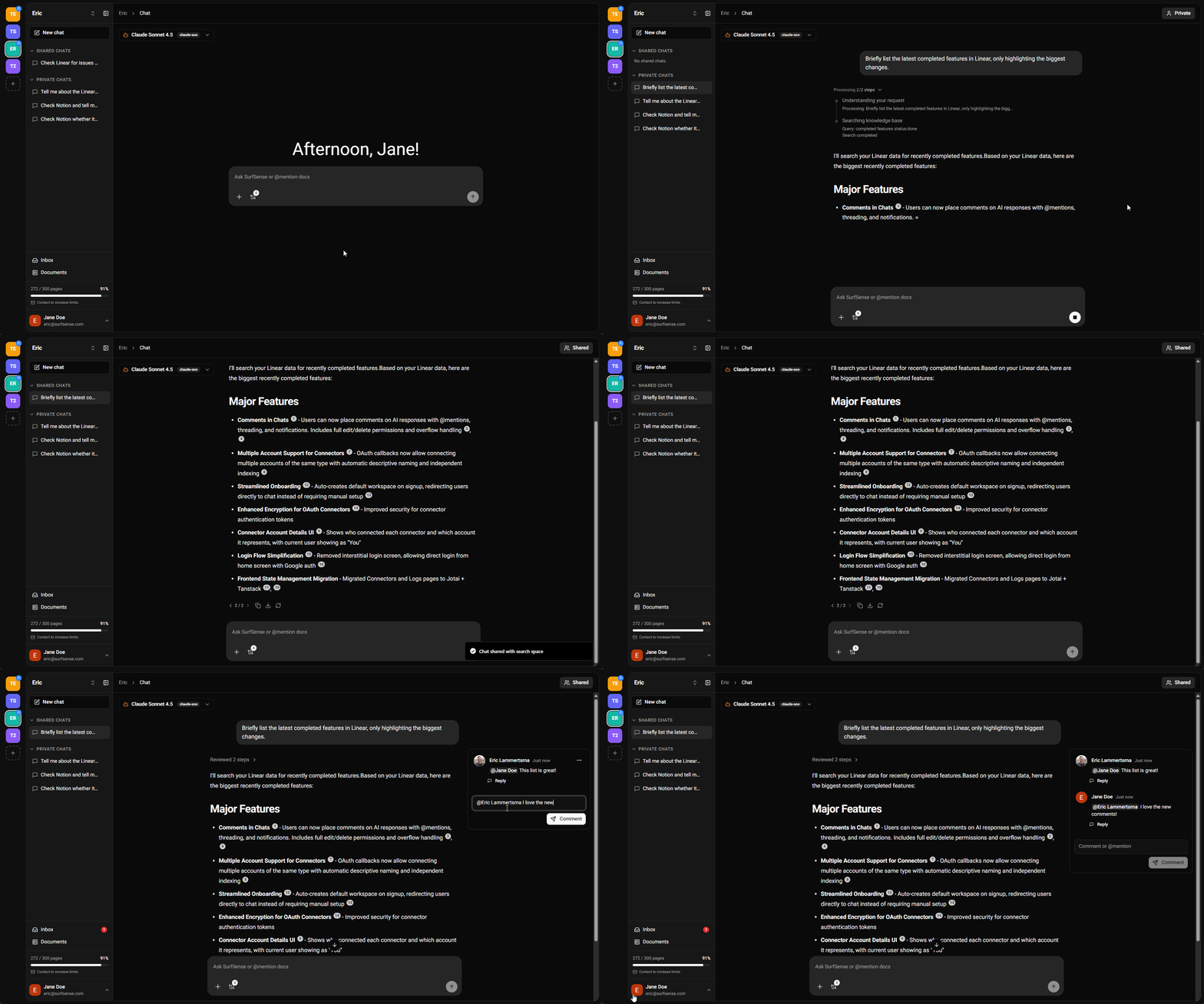
  • Multi-User Collaboration: Multiple users can now collaborate in the same chat in real-time
  • Status Indicators: See when the AI is responding to another team member
  • Instant Sync: Changes sync instantly across all open tabs and users

Chat Comments with @Mentions

  • Comment on AI Responses: Discuss responses directly with your team
  • Single-Level Threading: Reply to comments with organized threads
  • @Mentions: Tag teammates to get their attention
  • Real-Time Notifications: Receive instant alerts when someone mentions you

Real-Time Notifications

  • Instant Updates: Replaced slow polling with instant notifications using ElectricSQL + PGlite
  • New Inbox: See connector indexing, document processing, and system events immediately
  • Cross-Tab Sync: Syncs across all your browser tabs in real-time

Connector Enhancements

OAuth Migration for Better Security

  • New OAuth Connectors: Migrated Linear, Slack, Notion, Discord, Confluence, and Jira to OAuth-based authentication
  • Circleback Integration: Connect your AI meeting notes from Circleback
  • Future Date Indexing: Index future dates for calendar-based connectors to plan ahead
  • 5-Minute Periodic Syncing: Near-real-time updates option
  • Real-Time UI Updates: See connector indexing progress without page refreshes

No longer broken

  • Syncs with no new content now show "Already up to date!" instead of falsely reporting failures
  • Restored missing indexing options page for Google Drive connector
  • File mention picker now handles large document counts with server-side search and pagination
  • Reasoning steps no longer overlap with chat input field
  • File upload modal is now scrollable when adding many files
  • OAuth connectors now display properly on mobile devices

Developers

  • Made Alembic migrations idempotent for safer deployments
  • Migrations now work on fresh databases from scratch
  • Major refactoring of chat components for better maintainability
  • Streamlined sidebar and connector page code
  • Fixed legacy route handling
  • Fixed hardcoded Docker values for complex deployments

This release transforms SurfSense into a truly collaborative, real-time platform with a redesigned interface that puts chat front and center. The addition of comments, @mentions, and live collaboration features makes it easier than ever for teams to work together without leaving the app.

SurfSense is your AI-powered federated search solution, connecting all your knowledge sources in one place.

January 8, 2026Version 0.0.11

SurfSense v0.0.11: Connectors And More Connectors

What's New in v0.0.11

This release focuses on connectivity and ease of use for your enterprise search software. We've begun a comprehensive UX overhaul, streamlining how you connect your data sources, alongside a fully responsive mobile interface that lets you access SurfSense's AI enterprise search capabilities from anywhere.

New Features

  • Mobile-Ready Interface: A fully responsive UI implementation allows you to search and collaborate seamlessly from your mobile device, bringing enterprise search solutions to your pocket.
  • Streamlined Connector Management: We've simplified the connector setup and management pages as part of a larger, ongoing UX overhaul for a smoother experience.
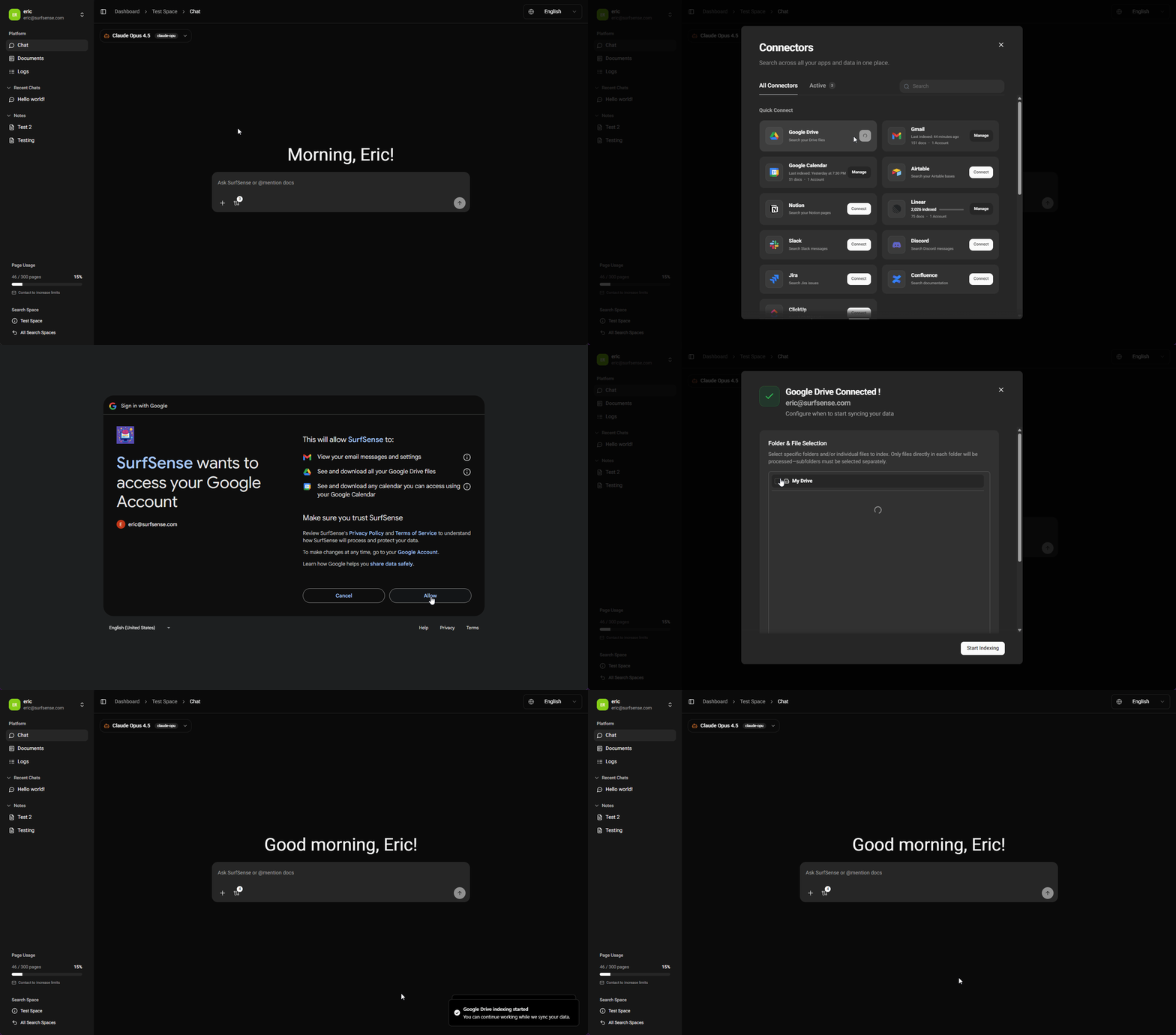
  • Google Drive Integration: Added a dedicated connector for Google Drive, featuring granular file selection to index only what you need for precise enterprise search.
  • Circleback Support: Introducing a new connector for Circleback to integrate your meeting notes and insights into your unified knowledge base.
  • Simplified OAuth Authentication: All supported connectors have been migrated to OAuth, making setup faster and more secure across your enterprise search software stack.
  • Multi-Account Support: Connect multiple accounts for the same service (e.g., Personal and Work Google Drives) to unify all your data sources in one AI-powered search hub.

No longer broken

  • Fixed a login issue affecting specific Google accounts on surfsense.com
  • Resolved most Docker self-hosting configuration issues for easier deployment

For self-hosters

  • Docker configuration has been streamlined for smoother self-hosted deployments
  • OAuth setup is now consistent across all connectors

SurfSense is an open-source AI enterprise search solution that connects all your knowledge sources, from Google Drive to Slack to meeting notes, in one intelligent, federated search platform. Whether you're looking for enterprise search software for your team or a personal knowledge assistant, SurfSense delivers powerful enterprise search solutions with the flexibility of self-hosting.

🚀 Connect more, search smarter!

December 24, 2025Version 0.0.9

What's New in v0.0.9

This release introduces the SurfSense Agent, a shift from pre-determined workflows (DAG) to dynamic, LLM-driven decision making.

  • Smarter Source Selection: Intelligently searches all connected sources based on your query, not just the ones you specify
  • Temporal Queries: Understands time-based questions like "Slack messages from last week"
  • Reasoning & Refinement: Iteratively refines answers for better accuracy
  • Better Prompt Handling: Knows when to respond in chat vs generate a podcast
  • Faster Indexing: Improved speed when syncing connected sources
  • MCP Compatibility: Extensible architecture supporting Model Context Protocol servers

Developers

  • More extensible architecture for adding connectors and tools
  • Supports long-running agents for complex tasks
  • Cleaner codebase enables faster contributions

Notes

  • May increase API costs due to dynamic LLM calls
  • Users with small local models may see varied performance

SurfSense is an AI-powered federated search solution that connects all your knowledge sources in one place.

🎄 Merry Christmas from the SurfSense team!