
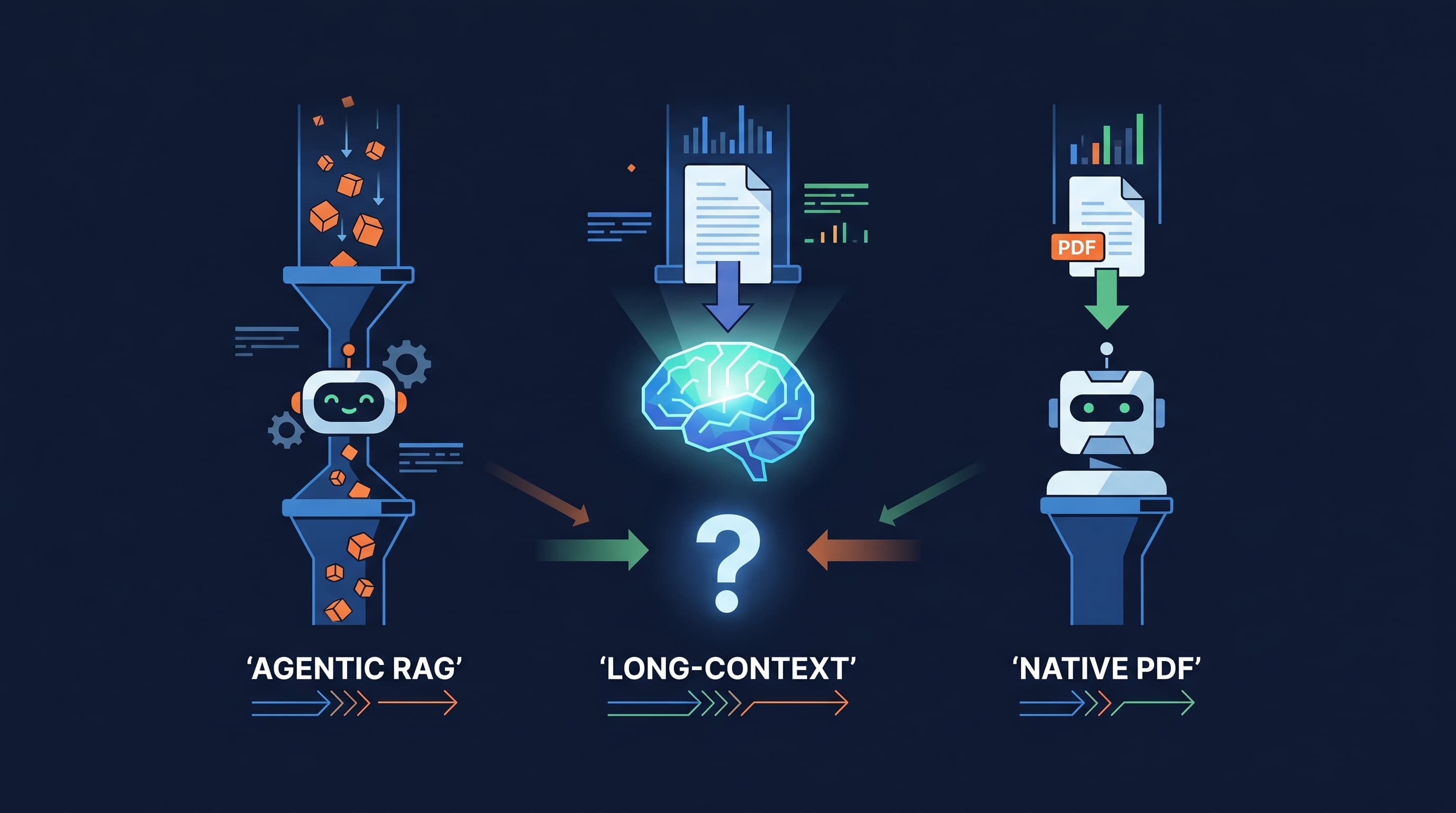
Agentic RAG vs Long-Context LLMs: A 171-Question Benchmark on 30 Long PDFs
Agentic RAGLong-Context LLMRAG vs AgenticVision LLM vs OCRBenchmarkClaude Sonnet 4.5MMLongBench-Doc
 SurfSense Team·
TL;DR for skimmers
We ran six different ways of answering questions over 30 long, image-heavy PDFs (a total of 171 real questions) using the same large language model, Claude Sonnet 4.5, and measured accuracy, cost per question, and how often each approach broke. The result:
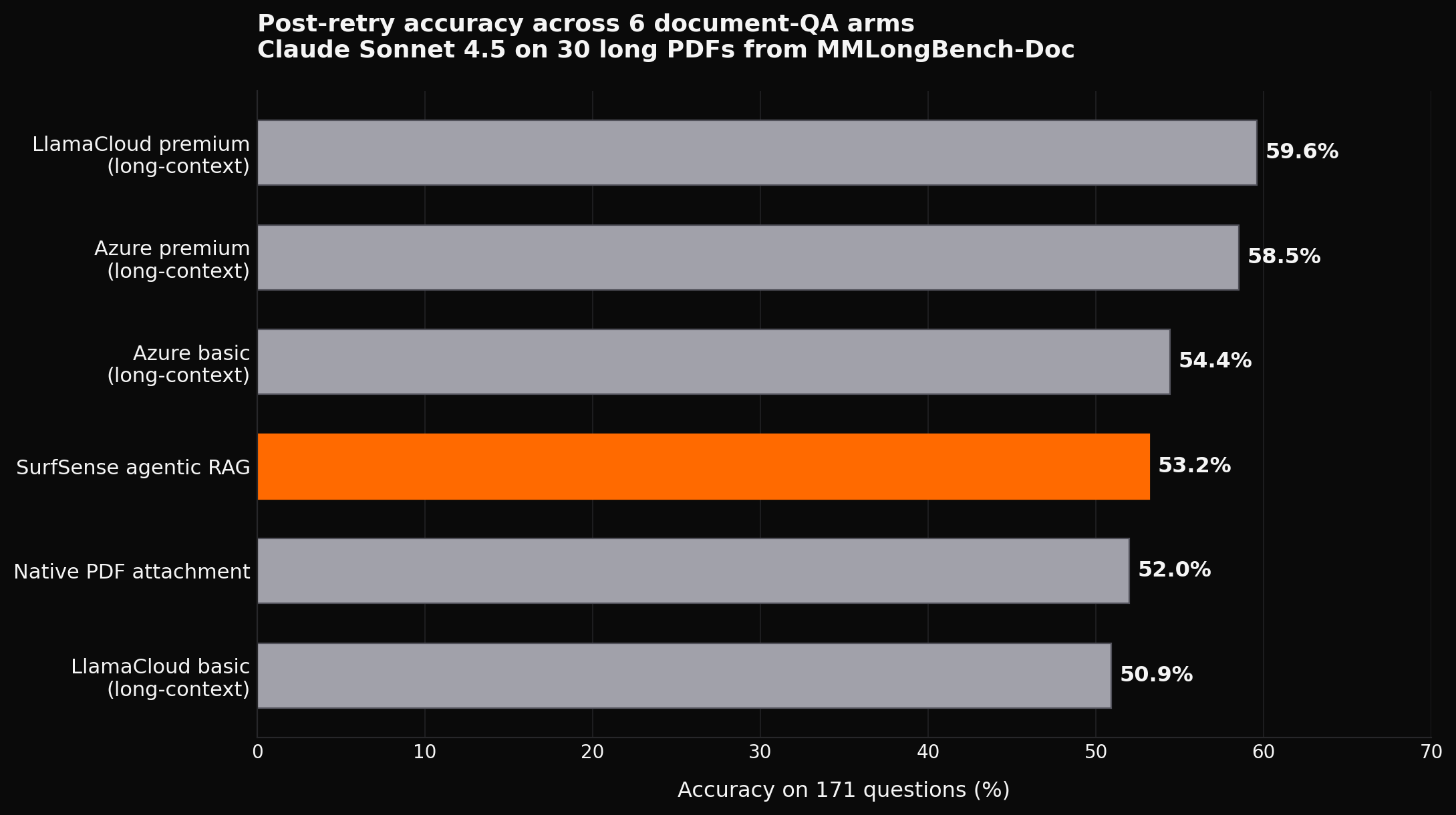
- Full-context "long-context" approaches won on raw accuracy (LlamaCloud premium 59.6%, Azure premium 58.5%).
- Agentic RAG was nearly as accurate (53.2%) at less than half the cost ($0.0827 per question vs $0.18–$0.26) and zero failed queries out of 171.
- Most accuracy gaps were not statistically significant. 12 of 15 head-to-head comparisons could be coin-flips (McNemar test, α = 0.05).
- Vision LLMs did not beat traditional OCR. Letting Claude read the PDF directly with its built-in vision (the
native_pdfarm) finished 5th of 6, behind every parser-based pipeline, with a stubborn 7% intrinsic failure rate that survived 5 retries with exponential backoff.Practical takeaway: if you are building a long-PDF Q&A product, agentic RAG is the boring-but-correct default. Reach for full-context only when the document fits, the budget allows, and the accuracy gain matters. Don't bet on vision LLMs replacing OCR pipelines yet.
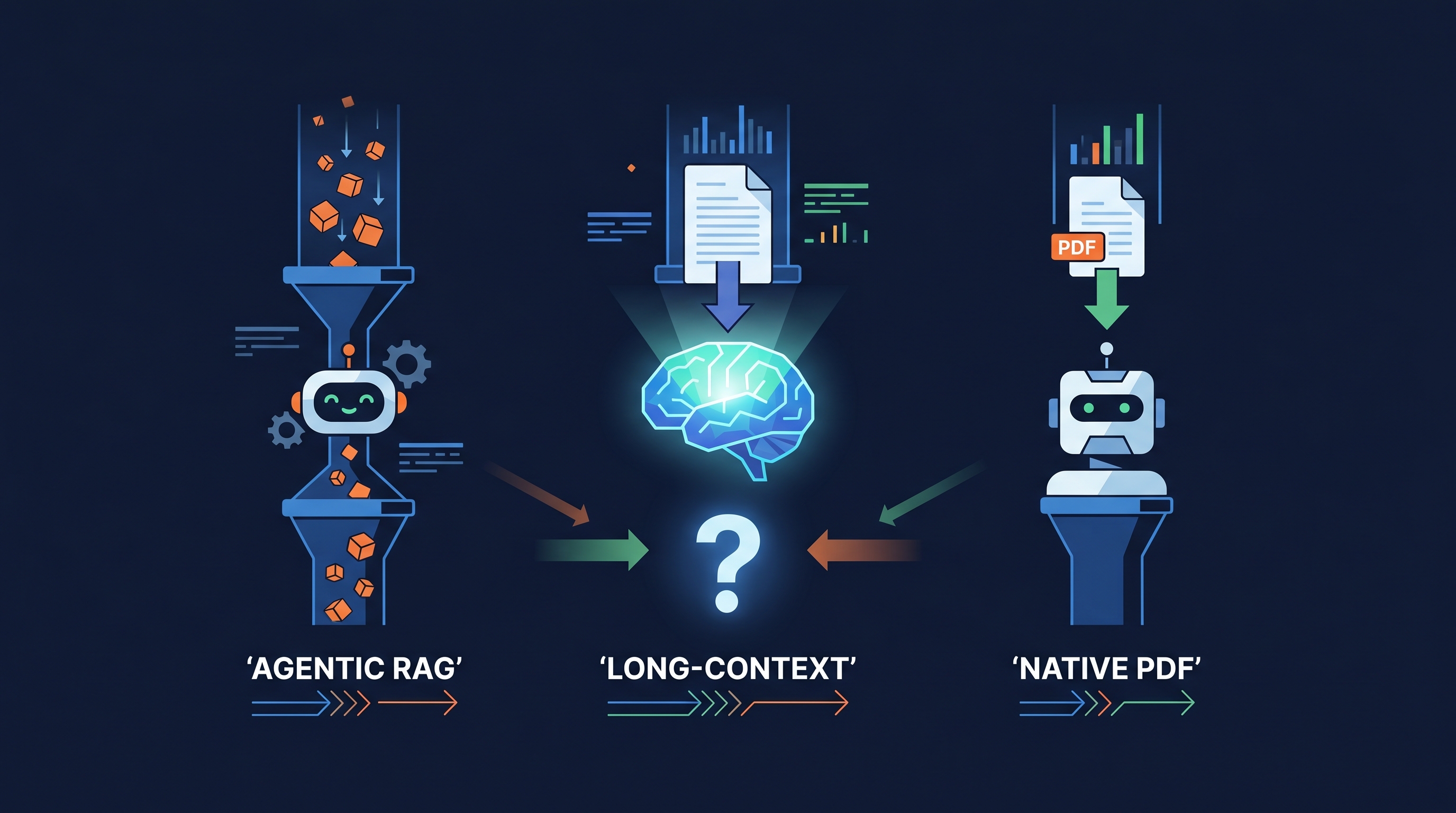
Why this matters: the agentic RAG vs long-context debate
If you are shipping anything that lets a user ask questions about a PDF, whether that is a contract analyser, a research assistant, or an internal docs chatbot, you have hit one of the loudest arguments in AI engineering today.
On one side: long-context LLMs. Modern models from Anthropic, OpenAI and Google now accept hundreds of thousands of tokens in a single prompt. Just stuff the whole document in and ask the question. Simple, fast to build.
On the other side: agentic RAG (retrieval-augmented generation, where an agent dynamically pulls relevant chunks instead of dumping the whole document into the prompt). More complex, but classically considered cheaper and safer at scale.
Layered on top of that is a quieter argument: do you even need a document parser anymore? Frontier models from Anthropic, OpenAI and Google now read PDFs natively using their vision stack. The story everyone wants to be true is that vision-capable LLMs make OCR pipelines obsolete. We tested that story too. Spoiler: not yet.
The internet is full of opinions and very thin on data, especially for long, multimodal PDFs (the messy, image-heavy real-world kind). So we built a benchmark with the same model on every arm and measured what actually happens, on both questions at once.
What is agentic RAG?
Quick definitions, in plain English, then we move to the data.
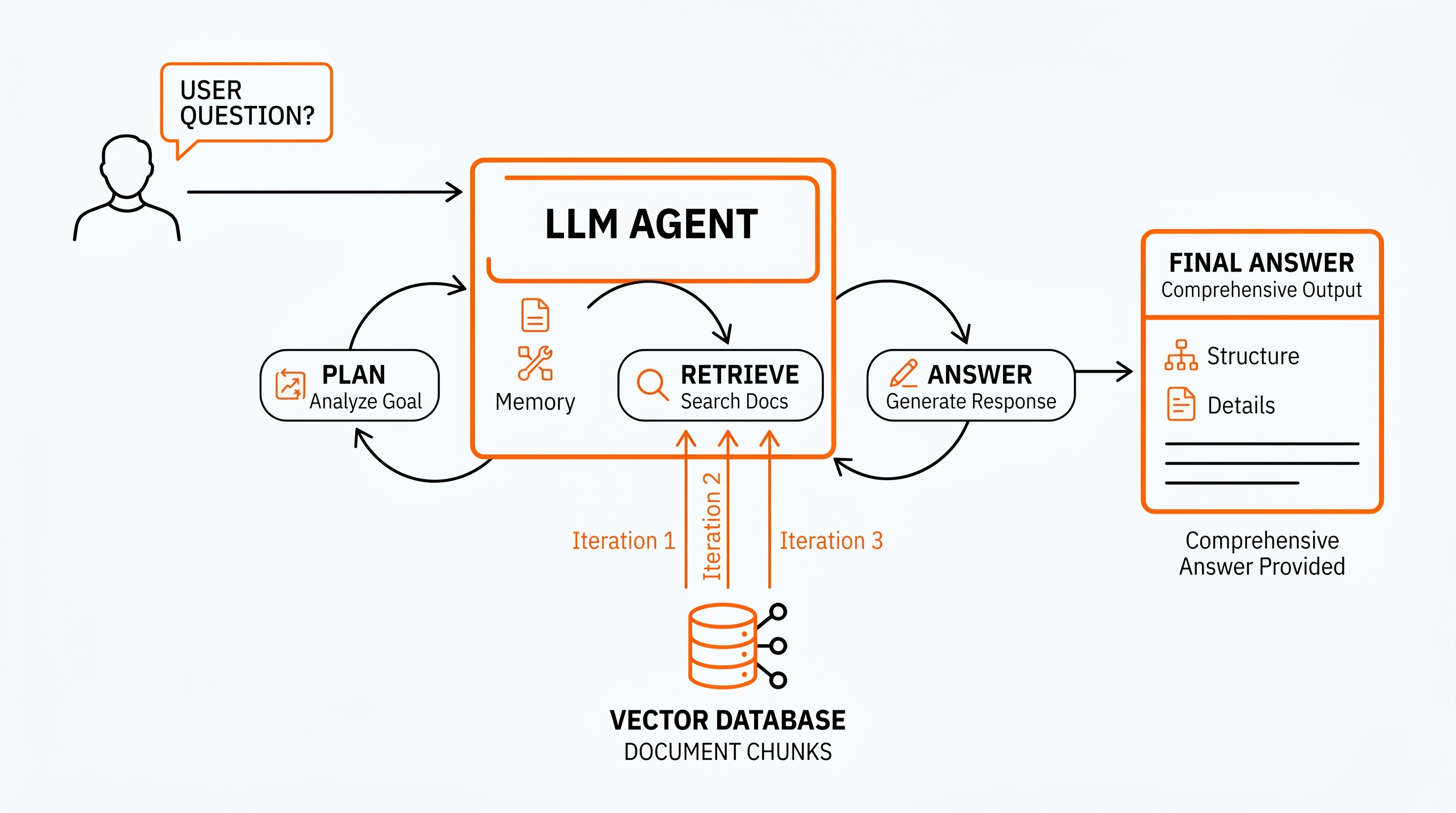
RAG (retrieval-augmented generation) is the standard pattern for letting a language model answer questions about your private documents. You chunk the documents into pieces, store them in a vector database, and at query time you retrieve the chunks most likely to contain the answer and pass them to the model.
Agentic RAG is RAG with an LLM agent in the driver's seat. Instead of one fixed retrieval step, the agent can:
- ask itself sub-questions,
- run multiple searches with different queries,
- decide when it has enough evidence,
- ignore irrelevant chunks,
- and stop when the answer is complete.
Think of vanilla RAG as handing a librarian one note that says "find me the answer to X". Agentic RAG is handing the same librarian a research brief and a clipboard, and letting them walk back and forth between the shelves until the report writes itself.
For a 5-minute video walk-through, IBM Technology has the highest-ranked explainer on YouTube right now (325k views, watched by us, and accurate):
How we ran the benchmark
To make the comparison fair, every arm answered the same questions and used the exact same large language model: Claude Sonnet 4.5, called through OpenRouter so the API path was identical.
The dataset was MMLongBench-Doc (paper, GitHub, Hugging Face), an open multimodal-document benchmark of long PDFs with vetted question-answer pairs. The full corpus is 135 PDFs averaging 47.5 pages each, with 1,091 expert-annotated questions across 7 domains (33% cross-page, 22.5% deliberately unanswerable to detect hallucinations). We used the first 30 documents (a mix of research papers, financial filings, product catalogues, and image-heavy reports) and all 171 of their answerable questions.
Why multimodal documents?
Real-world PDFs are messy. They contain charts, scanned tables, photos, multi-column layouts, and footnotes inside footnotes. A clean text-only benchmark wouldn't tell us anything useful about whether these approaches survive contact with the documents people actually upload to AI products. MMLongBench-Doc was built to include exactly that messiness, which is the territory where parser quality and retrieval strategy actually start to matter. We wanted the benchmark to look like the real inbox of an AI app, not a sanitised research toy.
Why only 30 documents?
The full MMLongBench-Doc corpus has 135 PDFs. Processing the entire dataset across all six arms would have taken significantly longer to complete on my machine, so we capped the run at 30 to keep iteration time reasonable. We're upfront about what that costs us statistically in the significance section below: a bigger sample would have tightened every confidence interval. The findings here should be read as strong directional evidence, not a final verdict.
The six arms
| Arm | What it does | Preprocessing | What goes in the prompt |
|---|---|---|---|
native_pdf | Sends the raw PDF file directly to the model | None | The PDF itself, every question |
azure_basic_lc | Parses the PDF with Azure Document Intelligence (cheap mode) | $1 per 1,000 pages | The whole markdown, every question |
azure_premium_lc | Same as above, premium parser (preserves layout) | $10 per 1,000 pages | The whole markdown, every question |
llamacloud_basic_lc | Parses the PDF with LlamaParse (cheap mode) | $1 per 1,000 pages | The whole markdown, every question |
llamacloud_premium_lc | LlamaParse premium with layout/table preservation | $10 per 1,000 pages | The whole markdown, every question |
surfsense_agentic | Full agentic RAG pipeline | $10 per 1,000 pages (one-time ingest) | Only the chunks the agent decides to retrieve |
Arms 2-5 are what we call "long-context" or "full-context" stuffing: parse the PDF once, paste the entire result into every prompt. Arm 6 is the agentic RAG approach. Arm 1, the native_pdf "just attach the PDF" pattern, is doing double duty here. It is also the "vision LLM replaces OCR" hypothesis: instead of any markdown parser, the model reads the PDF directly using its built-in vision capabilities. If vision-capable LLMs are good enough to retire OCR pipelines, this arm should be at the top of the table. (It isn't.)
If you want to read the implementations, every arm lives in surfsense_evals/src/surfsense_evals/core/arms/ — the bare_llm.py arm handles full-context stuffing, native_pdf.py handles vision-LLM PDF attachment, and surfsense.py drives the agentic retrieval against the SurfSense /api/v1/new_chat endpoint. The full benchmark suite (prompts, ingest pipeline, runner) lives in suites/multimodal_doc/parser_compare/.
We graded answers with a deterministic, format-aware grader (1% relative tolerance for floats, F1 over normalised tokens for lists). We logged input/output tokens, cost, latency, and any HTTP error per question.
Headline results: who wins on accuracy?
After running all 171 questions through all 6 arms, then re-running the 37 failed queries with up to 5 attempts of exponential backoff, here is the scoreboard:
The full table including F1, raw failures, and median latency:
Bolded cell = winner of that column.
| Rank | Arm | Accuracy | F1 | Median latency | Raw failures |
|---|---|---|---|---|---|
| 1 | LlamaCloud premium, long-context | 59.6% | 61.1% | 6.8 s | 4 |
| 2 | Azure premium, long-context | 58.5% | 59.6% | 6.9 s | 3 |
| 3 | Azure basic, long-context | 54.4% | 56.6% | 7.1 s | 1 |
| 4 | SurfSense agentic RAG | 53.2% | 54.3% | 52.8 s | 0 |
| 5 | Native PDF attachment | 52.0% | 50.4% | 29.5 s | 27 |
| 6 | LlamaCloud basic, long-context | 50.9% | 53.2% | 7.1 s | 2 |
A few things jump out:
- The two long-context premium parsers win on raw accuracy, but only by about 6 percentage points over agentic RAG.
- Agentic RAG was the only arm with zero failures out of 171 questions.
- Native PDF attachment was the worst performer despite being the most "AI-native" approach. More on why in the failure-mode section.
- Latency on agentic RAG is high (52.8 s) because the agent does several retrieval rounds. For batch jobs it's fine; for chat UX you'd stream partial results.
Now the part most blog posts skip.
Cost per query: where agentic RAG wins big
Accuracy is only half the story. Every approach also has a price tag: the LLM call plus the document preprocessing.
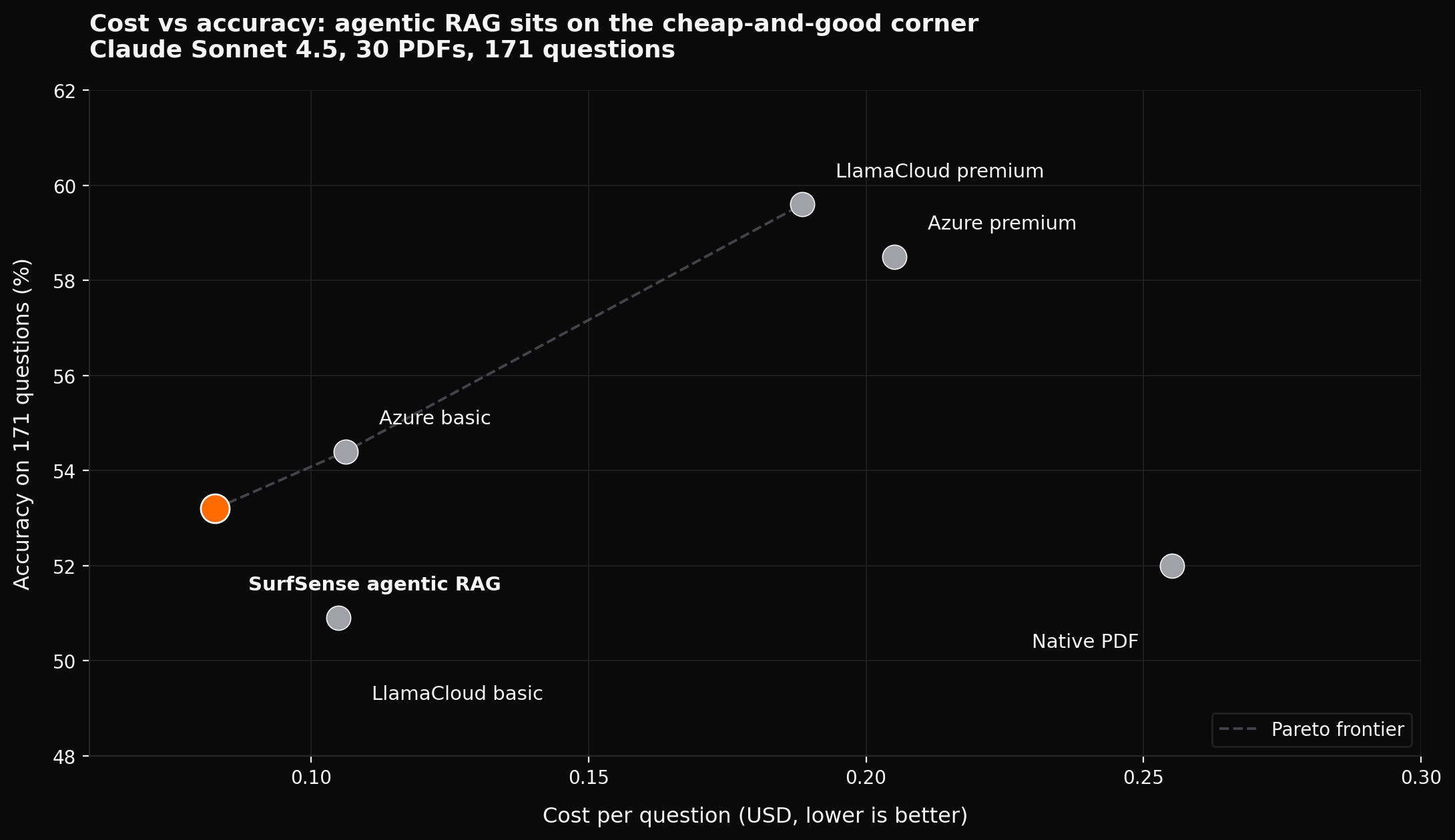
Bolded cell = winner of that column.
| Arm | Total $/Q | Accuracy |
|---|---|---|
| SurfSense agentic RAG | $0.0827 | 53.2% |
| LlamaCloud basic | $0.1049 | 50.9% |
| Azure basic | $0.1062 | 54.4% |
| LlamaCloud premium | $0.1885 | 59.6% |
| Azure premium | $0.2051 | 58.5% |
| Native PDF | $0.2552 | 52.0% |
The headline number: agentic RAG was the cheapest arm at $0.0827 per question, about 60% cheaper than the most accurate full-context arm and 67% cheaper than native PDF attachment. The technique wins on cost regardless of which agentic-RAG framework you use; we just happened to measure it with ours.
Why is agentic RAG so much cheaper? Because every full-context arm pays the parser+LLM bill for the entire document on every single question. A 100-page PDF? You pay for 100 pages of input tokens 10 times if the user asks 10 questions. Agentic RAG pays the parser once at ingest time, then only sends the retrieved chunks (often 1–5% of the document) per question.
There is a clean closed-form for this. If a document has P pages, a parser costs cp per page, the LLM costs cL per full-document call, and the user asks Q questions, then full-context cost-per-question is roughly:
Cost/Q ≈ (P × c_p) / Q + c_LFor agentic RAG it is:
Cost/Q ≈ (P × c_p) / Q + c_L × rwhere r is the retrieval ratio, typically 0.02 to 0.10. So the more questions per document, the more agentic RAG dominates. For knowledge bases that get queried more than a couple of times, the gap widens by the day.
Failure modes: what 37 broken queries taught us
We did not just count successes. We logged every error.
Of 1,026 total (arm, question) cells, 37 returned no answer on the first pass. We then re-ran only those 37 with up to 5 attempts of exponential backoff (the retry_failed_questions.py script in the harness). The results separated transient (network/server) failures from intrinsic (the approach actually cannot do this) failures:
Bolded cell = best result on that column (lowest failure rate, highest recovery rate).
| Arm | First-pass failures | Recovered on retry | Intrinsic failures | Intrinsic failure rate |
|---|---|---|---|---|
| All 4 long-context arms (combined) | 10 | 10 (100%) | 0 | 0% |
| Native PDF | 27 | 15 | 12 | 7.0% |
| SurfSense agentic RAG | 0 | n/a | 0 | 0% |
Two findings worth highlighting:
1. Long-context "context overflow" was a myth. We hypothesised that the long-context arms might be silently failing because the document didn't fit in the context window. We tested it: the failures clustered around HTTP/SSL errors (the request body was up to 30 MB, riding the public internet), not token limits. Once we retried, all 10 came back successfully. The Claude Sonnet 4.5 context window held up fine; the transport layer wobbled.
2. Native PDF has a stubborn 7% intrinsic failure rate. Two specific PDFs broke it permanently:
- a 27-page image-heavy PDF whose binary exceeded the provider's 30 MB request-body cap (6 questions broken);
- a 166-page PDF whose response stream the provider could never reliably terminate (5 questions, repeated
empty streamerrors).
Even with 5 attempts of exponential backoff, those 12 questions stayed broken. For any production app that processes PDFs from arbitrary users, that is a 7% "this document cannot be answered today" rate, which is unacceptable for most product flows.
Agentic RAG sidesteps both problems because it never sends the raw PDF and never sends the entire document context in one giant request.
What this means for the vision-LLM-vs-OCR debate
Bigger picture, the native_pdf numbers settle a question we wanted to answer: on long, image-heavy PDFs, vision-capable LLMs reading the document directly did not outperform plain OCR plus markdown. They came in 5th of 6 on accuracy (52.0% vs 50.9% to 59.6% for the OCR-based pipelines), were the most expensive arm at $0.2552 per question, and failed 7% of the time even after retries. Premium OCR with layout extraction held up better on the exact pages where you would expect vision to shine, the chart-and-table-heavy ones.
The point is not that vision LLMs are bad. They are remarkable. The point is that the parser pipeline you already maintain is not yet obsolete, and the "skip the parser, attach the PDF" shortcut is not a free lunch.
Statistical significance: are these results actually different?
This is the section most benchmarks omit, and it changes the conclusions.
We ran McNemar's exact-binomial test on every pair of arms (15 pairs total) using compute_blog_extras.py. McNemar is the right test for paired classifier comparisons: both arms answered the same questions, so we can ask: "of the questions where the two arms disagreed, did one really win more often than chance?"
The result: only 3 of 15 pairs are distinguishable at α = 0.05.
The three statistically-significant gaps are all between the worst arms (LlamaCloud basic, Native PDF) and the best arms (LlamaCloud premium, Azure premium). The most interesting comparison, SurfSense agentic RAG vs the long-context premium arms, does not clear the significance bar. The 6-point gap could plausibly be sample noise.
In other words: on this dataset, the headline claim "long-context beats agentic RAG by 6 percentage points" is real on the scoreboard but not statistically robust. Run the same benchmark on a different sample of 30 PDFs and the order could shuffle. This is also the place where our 30-document scope bites us: a bigger run would have given more comparisons enough power to settle.
When to choose what: a decision framework
Reading the data without an action plan is half the value. Here is how we would decide for a real product, using the same numbers.
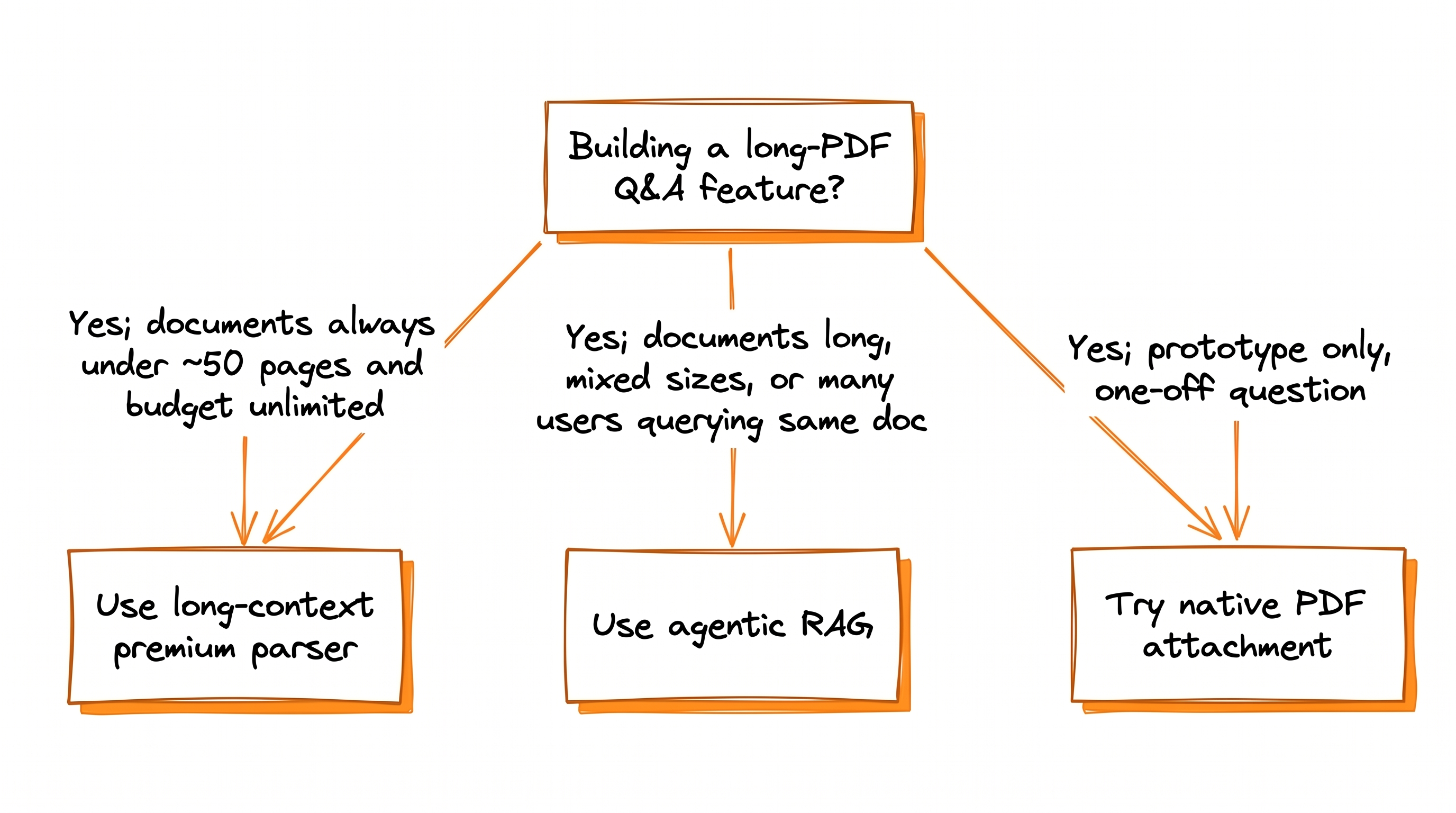
Use agentic RAG when
- documents are long and mixed in size (some 5 pages, some 500),
- the same documents will be queried more than once or twice,
- cost per query matters (SaaS pricing, large user base),
- you cannot afford intermittent failures on big PDFs,
- you need to scale to corpora of thousands of documents.
This is the default for most production AI products.
Use long-context (full-context) LLMs when
- documents reliably fit in the context window after parsing (typically under ~150 pages of text),
- the accuracy gain (6 percentage points in our benchmark, or zero, depending on which way the noise goes) actually justifies the 60–150% extra cost,
- you have one or two questions per document, not dozens,
- you can absorb occasional network failures on large request bodies.
Premium parsing matters here. Spending $10 per 1,000 pages on a layout-aware parser is worth it: it gave us +4 to +9 accuracy points over basic parsers on the same questions.
Use native PDF attachment when
- you are prototyping and want to ship in an afternoon,
- documents are small and well-formatted,
- you can tolerate a 7% failure rate (or you have validated the specific PDFs you care about don't trip the limits).
Don't use it as the default for user-uploaded PDFs in production. The 30 MB request-body cap and unstable response streams will bite you, and exponential backoff will not save you.
Frequently asked questions
What this means for your AI app
If you are choosing an architecture for a long-PDF Q&A product today:
- Start with agentic RAG. It is the cheapest, most robust default and gets you within statistical noise of full-context approaches.
- Pay for premium parsing once. Whether you choose RAG or full-context, layout-aware parsing buys you real accuracy points. The marginal cost is trivial against the LLM bill.
- Avoid plain "attach the PDF" in production unless you have validated every document path. The 7% intrinsic failure rate is real and not retry-able.
- Don't trust accuracy gaps under 5–6 points unless you have tested for significance. McNemar takes 30 seconds in Python and saves embarrassing benchmark posts.
- Don't bet on vision LLMs replacing OCR yet. On 30 long, image-heavy PDFs, the native PDF (vision LLM) path lost to every OCR-based pipeline on accuracy and was the most expensive arm at $0.2552 per question. The OCR pipeline you already maintain is not obsolete.
Reproduce this benchmark
Everything that produced these numbers is open source. The eval harness is its own package inside the SurfSense monorepo:
surfsense_evals/— the harness root (extensible base classes, providers, cost ledger).suites/multimodal_doc/parser_compare/— the benchmark used in this post (prompts, ingest, runner).core/arms/bare_llm.py,native_pdf.py,surfsense.py— the three arm implementations.mmlongbench/grader.py— the deterministic format-aware grader.scripts/retry_failed_questions.py— the failed-only retry pass with exponential backoff.scripts/compute_blog_extras.py— the McNemar pairwise tests, latency/token percentiles, and per-PDF heterogeneity.scripts/compute_post_retry_accuracy.py— merges retry survivors back into the run and recomputes the headline numbers.
A minimal end-to-end run looks like:
# 1. Clone, install (uv recommended)
git clone https://github.com/MODSetter/SurfSense
cd SurfSense/surfsense_evals
uv sync --extra dev

# 2. Configure provider keys (Azure DI, LlamaCloud, OpenRouter, SurfSense)
cp .env.example .env
$EDITOR .env

# 3. Ingest the first 30 PDFs from MMLongBench-Doc into all parsers
uv run python -m surfsense_evals.cli setup multimodal_doc \
  --vision-llm anthropic/claude-sonnet-4.5
uv run python -m surfsense_evals.cli ingest multimodal_doc \
  --suite parser_compare --max-docs 30

# 4. Run all six arms × all 171 questions
uv run python -m surfsense_evals.cli run multimodal_doc \
  --suite parser_compare --sample-per-doc 20 --concurrency 2

# 5. Retry failures + compute final stats
uv run python scripts/retry_failed_questions.py
uv run python scripts/compute_post_retry_accuracy.py
uv run python scripts/compute_blog_extras.py
The dataset itself is on Hugging Face and the original GitHub repo (NeurIPS 2024 D&B Spotlight, paper). Bring your own LLM provider; swap anthropic/claude-sonnet-4.5 for openai/gpt-4o, google/gemini-2.5-pro, or any OpenRouter slug to repeat the experiment with a different model.
If you find that the rankings shuffle on your own document set, we want to hear about it. Open an issue on the SurfSense repo with the run artifacts and we will link your results from this post.
The eval harness is open source and runs against any OpenRouter model, so you can re-run the same questions on openai/gpt-4o, google/gemini-2.5-pro, or whichever model you are evaluating for production. Wire your own RAG framework into the Arm base class (LangChain, LlamaIndex, Haystack, your own stack) and you can drop it into the same comparison without changing the rest of the pipeline.
If you want a hosted way to try agentic RAG on your own PDFs without writing the harness yourself, SurfSense is one option (it is the same agentic stack that powered the surfsense_agentic arm above).